
What is the purpose of this article? To trace the data path from an inline Rheonics density and viscosity measurement, through the Honeywell Enraf CIU 888, into Entis Pro tank inventory, and to explain how to configure Entis to use this continuous reading in place of, or alongside, a periodic servo density dip. What products are involved? The Rheonics SRD for liquid density or the Rheonics DVP for gas density, depending on the application. The sensor connects to a CIU 888 field port through the Rheonics Sensor Electronics (SME). |
TABLE OF CONTENTS
- 1. Two separate configuration passes
- 2. How a Rheonics register reaches Entis
- 3. Building the host-side map, step by step
- 4. Servo dip vs. inline SME density: what actually changes
- 5. Verifying the path end to end
- References
Once the SME is polling correctly on a CIU 888 field port (see Connecting Honeywell Enraf tank gauging system to Rheonics process density meter), the next step is getting that density and viscosity reading into the inventory calculation itself. This article covers the three links in that chain: the CIU 888 host-side Modbus map, the Entis Pro tag configuration, and the practical choice between replacing or supplementing a servo dip with a continuous inline reading.
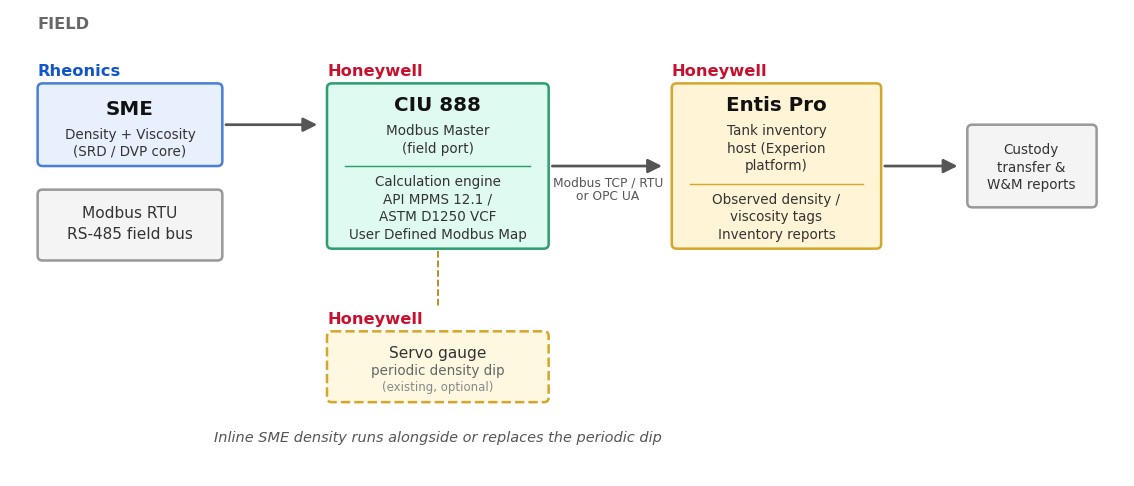
Figure 1. End-to-end data path from the SME to Entis Pro inventory reports
The SME is available in three variants (Figure 2). All three carry the same Modbus RTU registers, so everything in this article applies to any of them; the variant only changes the installation.
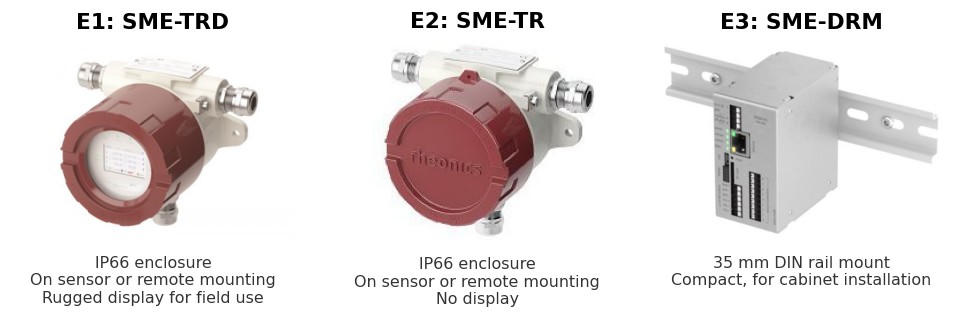
Figure 2. Rheonics Sensor Electronics (SME) variants: E1: SME-TRD, E2: SME-TR and E3: SME-DRM
1. Two separate configuration passes
Entis Pro does not talk to the SME directly. It reads the CIU 888's host port, over Modbus TCP, Modbus RTU, or OPC UA depending on the site, and the CIU 888 in turn is the device that polls the SME on its field bus. Entis Pro never sees a Rheonics register address; it sees whatever the CIU 888 has been configured to expose on its host-side map.
Note: Figures 3, 4 and 5 are CIU 888 Service Tool screen captures taken from the Honeywell CIU 888 Configuration Manual [4]. They show Honeywell's example configuration and are included to illustrate the steps; tank names, entities and addresses on a real site will differ. |
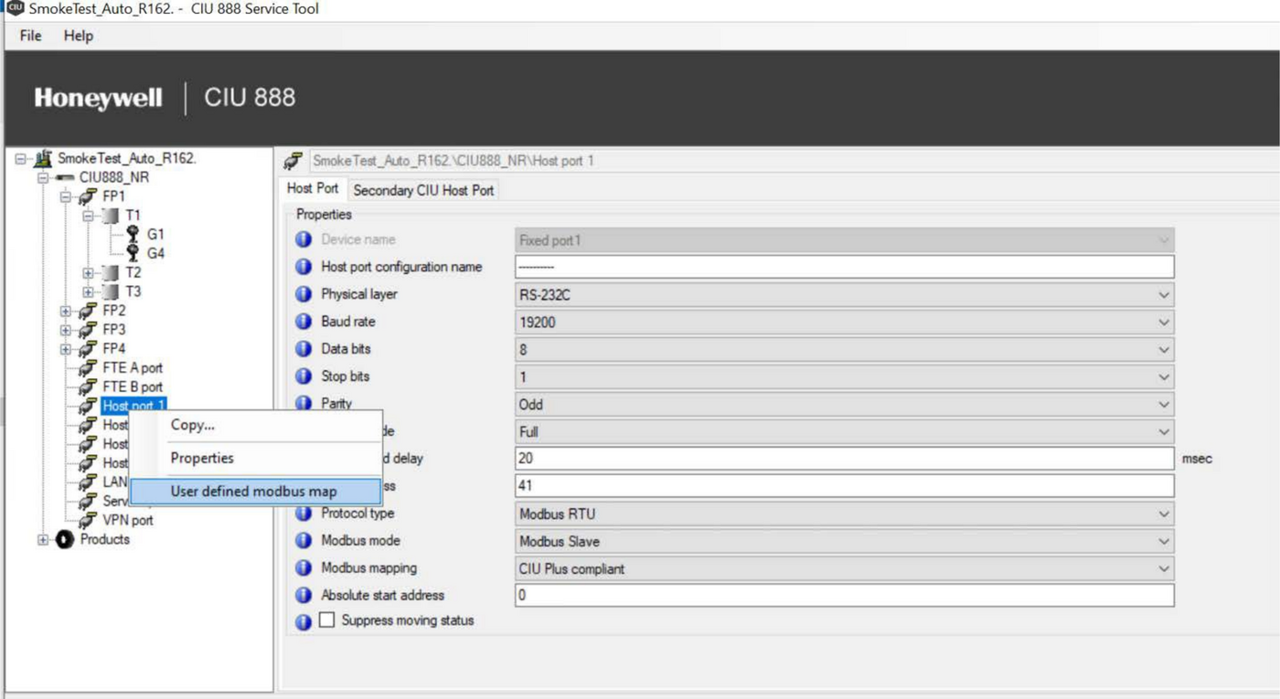
Figure 3. CIU 888 Service Tool: Host port 1 properties, with the right-click context menu showing "User defined modbus map" [4]
2. How a Rheonics register reaches Entis
Getting an SME reading into an Entis inventory tag involves three linked steps: the field-side device definition, the host-side entity selection, and the register offset that ties the two together.
Field side: the SME is added as a Modbus RTU field device on a Field port node (FP1 to FP4), with its density, viscosity, and temperature registers defined manually, since the SME is not one of Honeywell's native GPU/Flexconn/TRL-2 gauge types. The field-side registers, as configured, are listed in Table 1.
Table 1. SME field-side registers polled by the CIU 888
| Modbus Register | Parameter | Data Type | Notes |
| 300040 | Sensor error status | Float32, Big-endian | MSB_First / MSW_First |
| 300041 | Viscosity | Float32, Big-endian | DeviceUnitType = ANY (no native VISCOSITY type on CIU 888) |
| 300049 | Density | Float32, Big-endian | Maps toward a DENSITY-type entity (e.g. DObsDipped) on the host side |
| 300057 | Temperature | Float32, Big-endian | Maps toward the TEMPERATURE-type entity (ProductT) |
These are the SME's own field-side Modbus RTU input registers, which the CIU 888 polls on the field port. Once the CIU 888 polls them, they are internal to it; Entis never reads 300041 or 300049 directly. What Entis reads is whichever host-side entity and Modbus Address that field-side value has been routed into, described next.
Host side, Tanks tab: on the relevant host port, the User Defined Modbus Map's Tanks tab moves the tank carrying the SME from Available Tanks to Selected Tanks. This selects which tank's parameters are exposed, not yet which parameters.
Host side, Entities tab: once a tank is selected, its Available Entities list is populated with CIU 888's own native, calculated tank parameters: ProductLevel, ProductT, VCF, DisplacerPosition, and, for density specifically, entries such as DObsDipped (density observed from a servo dip) and DObsHIMS. The SME's reading is exposed to Entis by populating one of these entities: either a custom entity, if the field-side device definition provides one, or the same density entity the servo dip currently reports into (DObsDipped), so the CIU's built-in VCF calculation picks it up without any change on the Entis side.
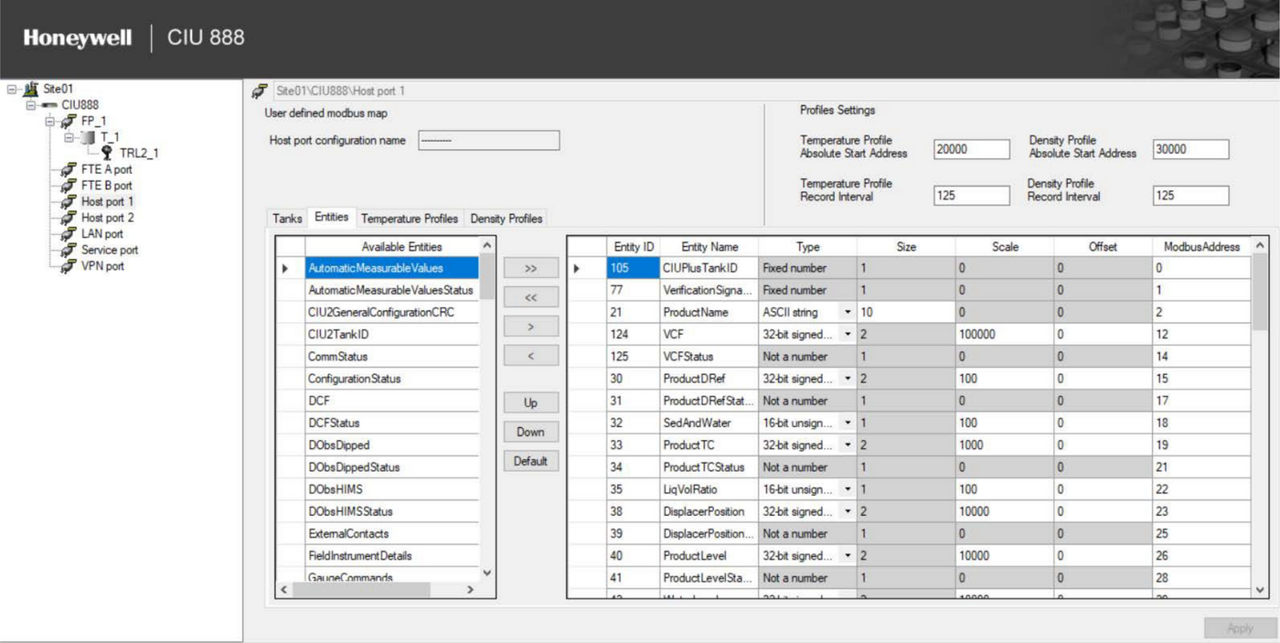
Figure 4. User Defined Modbus Map, Entities tab: Available Entities (native CIU tank parameters, including density sources DObsDipped and DObsHIMS) and Selected Entities with their Modbus register offsets [4]
Host side, register offset: the entity's position in the Selected Entities table (columns Entity ID, Type, Size, Scale, Offset, and ModbusAddress) determines the actual register Entis or any Modbus client reads on the host port. This ModbusAddress value is what Entis's own tag configuration must be pointed at.
Three separate address spaces: the host port itself has its own Absolute start address (default 0) for general user-defined entities, while the User Defined Modbus Map's Profiles Settings tab sets two further, independent Absolute Start Address values: one for the Temperature Profile block and one for the Density Profile block (20000 and 30000 respectively in the example below). A register number only makes sense once you know which of these three blocks it belongs to.
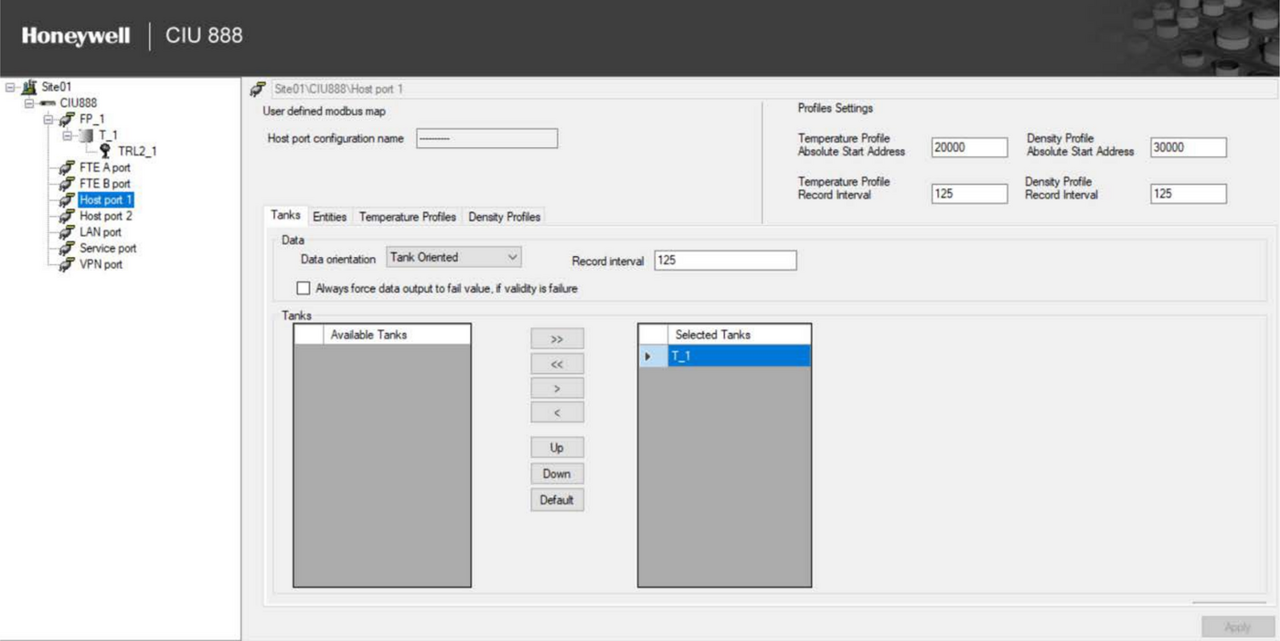
Figure 5. User Defined Modbus Map, Profiles Settings tab: separate Absolute Start Address values for the Temperature Profile (20000) and Density Profile (30000) blocks, each with its own Record Interval [4]
3. Building the host-side map, step by step
Step 1. On the CIU 888 Service Tool, right-click the relevant Host port node and choose User defined modbus map (Figure 3).
Step 2. On the Tanks tab, move the tank carrying the SME from Available Tanks to Selected Tanks.
Step 3. On the Entities tab, locate the entity that will carry the SME's reading. If a Rheonics/custom entry is present, select it; if not, confirm with Honeywell or your commissioning notes which native entity (for density, most likely the same slot the servo dip reports into) the field-side SME registers have been mapped onto (Figure 4).
Step 4. Note the ModbusAddress column value for that entity in the Selected Entities table. This, combined with the block's Absolute Start Address from the Profiles Settings tab, is the actual register Entis needs to be told to read (Figure 5).
Step 5. Confirm the Absolute start address at the host port level does not collide with addresses already used by other tanks or entities on that port; the Configuration Manual's own example raises this start address when a site has enough tanks to need the extra room.
Step 6. Confirm each RTU address on the site stays unique, host side and field side alike.
Step 7. Viscosity (field register 300041) has no native Entis device unit type the way density and temperature do, so on the host side it is carried as a generic user-defined value (DeviceUnitType = ANY, the same setting used on the field-side device definition). Confirm with your Entis configuration engineer how the target inventory report should label it.
4. Servo dip vs. inline SME density: what actually changes
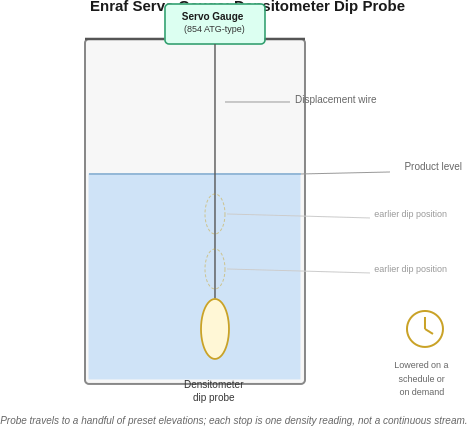
Before the SME is added, product density for inventory calculation on most Enraf sites comes from a servo gauge's periodic density dip: the servo lowers a densitometer through the product on a schedule (or on demand) and returns a handful of readings, not a continuous stream. Entis's own profile handling reflects this, supporting up to ten density points collected this way per tank.
Figure 6. Enraf servo gauge densitometer dip probe: the probe travels down a displacement wire to a handful of preset elevations, each stop producing one density reading on a schedule or on demand | 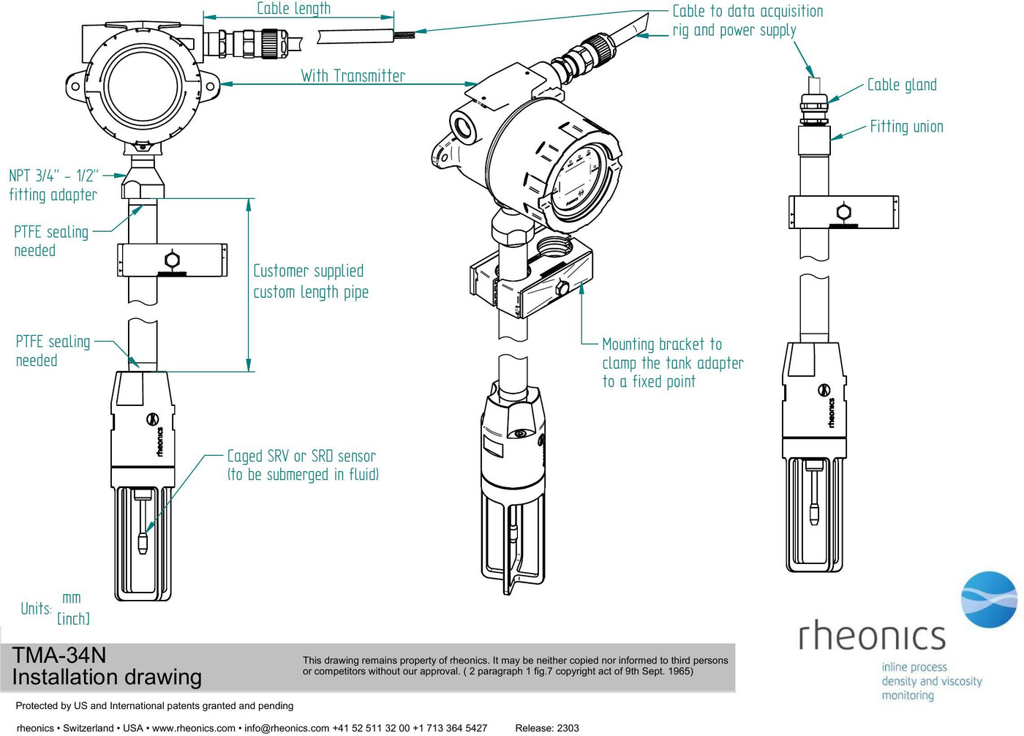 Figure 7. Rheonics TMA-34N tank mount installation: SRV/SRD sensor caged and submerged in the tank fluid, with cable routed through the mounting pipe to the data acquisition and power supply [5] |
Unlike the servo's dip probe, the sensor in Figure 7 stays in continuous contact with the product. An inline SME changes the shape of the density input from a periodic sample to a continuous stream, but it does not change what Entis does with a density value once received: the same API MPMS Ch. 11.1 (ASTM D1250) volume correction applies within the API MPMS Ch. 12.1 quantity calculation, whether the density came from a dip a few hours ago or from the sensor a few seconds ago.
Two ways to bring the SME reading in: Alongside the dip: the inline reading is trended and reported as a separate tag, while the servo dip continues to drive the certified inventory calculation. In place of the dip: the SME's continuous reading is mapped into the same Entis density field the dip previously fed, giving the inventory calculation a live value instead of a stale one between dips. This generally requires the site's Entis configuration engineer and, if the tank is under custody transfer, a Weights and Measures sign-off before the change is certified. |
In both cases the unit conversion step still applies: the SME reports density in g/cm³, and Entis and the CIU 888 typically work in kg/m³, °API, or relative density (60/60°F), so confirm which unit the target density field expects and that the conversion is configured once, rather than at both the CIU and Entis.
5. Verifying the path end to end
Once the host map is built and the Entis tag is configured, a practical way to confirm the whole chain is working is to compare three points at once: the live reading on the SME the value on the CIU 888 host port register (readable with any Modbus client during commissioning), and the tag value shown in Entis. If the CIU 888 register matches the sensor but Entis does not update, the fault sits in the Entis tag mapping rather than the Modbus link; if the CIU 888 register itself does not move, the fault is on the host-side map or the field poll, not in Entis.
References
[1] Honeywell Process Solutions, Entis Tank Inventory System, process.honeywell.com [2] Honeywell CIU 888 Configuration Manual, Part No. 4417584_Rev12, Section 3.2.12 (User Defined Modbus Map), sub-sections 3.2.12.1 (Tanks), 3.2.12.2 (Entities), 3.2.12.3 (Temperature Profiles), 3.2.12.4 (Density Profiles) [3] Honeywell CIU 888 Datasheet, Density and Temperature Profile specifications [4] Honeywell CIU 888 Configuration Manual, Part No. 4417584_Rev12, CIU 888 Service Tool screen captures (example site configuration SmokeTest_Auto_R162). Source of Figures 3, 4 and 5. [5] Rheonics TMA-34N Tank Mount Adapter, installation drawing, cdn.rheonics.com |