
What is the purpose of this article? To explain how the field-side polling of a Rheonics sensor behaves across a Primary/Secondary CIU 888 pair, what actually happens during a failover, and the distinction between the Configuration lock and the W&M lock, since these two key switches are often confused but govern different things. What products are involved? The Rheonics SRD for liquid density or the Rheonics DVP for gas density, depending on the application. The sensor connects to a CIU 888 field port through the Rheonics Sensor Electronics (SME), on sites where the CIU 888 is deployed as a redundant, hot-standby pair rather than a single unit. |
TABLE OF CONTENTS
- 1. What gets synchronized
- 2. Failover expectations
- 3. W&M sealing: Configuration lock vs. W&M lock
- 4. Practical checklist for a redundant site
- Related articles
- References
Redundant CIU 888 sites use two physical units, referred to as the Primary and Secondary CIU 888, linked through their Sync Link ports at the back of each unit using a Cat. 5 Ethernet cable. Only one of the two is active at any time; the other is passive. Either the Primary or the Secondary can hold the active role, since the active role is a runtime state, not a fixed identity.
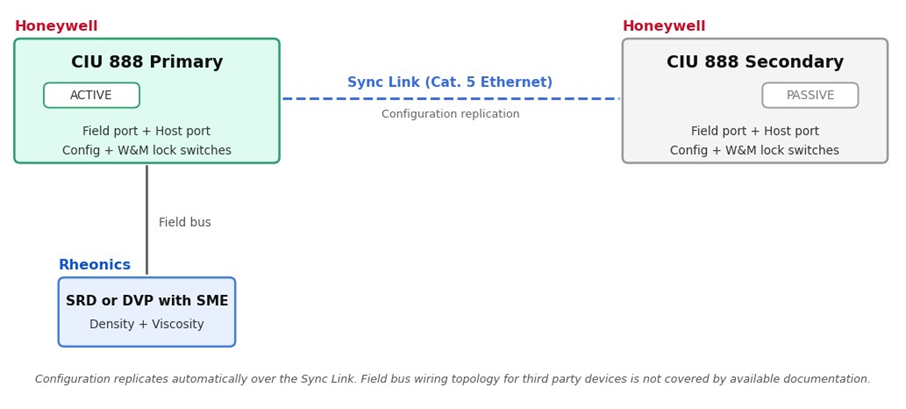
Figure 1. Redundant CIU 888 pair: configuration replicates from the Primary to the Secondary over the Sync Link, while the Rheonics sensor sits on the field bus
The SME is available in three variants (Figure 2). All three carry the same Modbus RTU registers, so everything in this article applies to any of them; the variant only changes the installation.
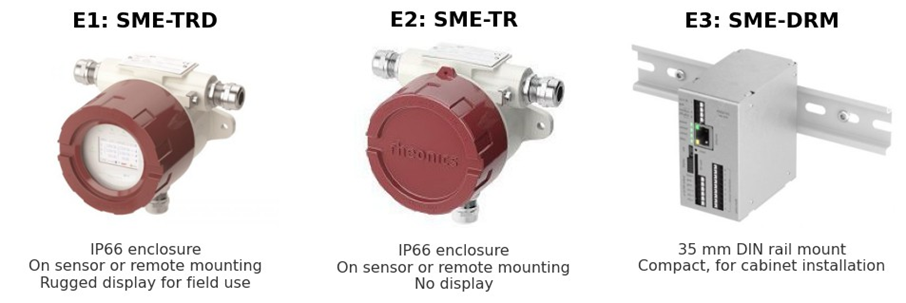
Figure 2. Rheonics Sensor Electronics (SME) variants: E1: SME-TRD, E2: SME-TR and E3: SME-DRM
1. What gets synchronized
When a Primary CIU 888 is configured, its site configuration, including field port setup and device definitions, is synchronized to the Secondary (Passive) CIU 888 automatically through the private Sync Link. This is the recommended setup path for most sites: the CIU 888 handles configuration synchronization on its own, rather than requiring the same configuration to be entered twice.
According to the Configuration Manual, the synchronization covers configuration only: site configuration, tank definitions and field port setup are copied from the Primary to the Secondary [1].
Field wiring in a redundant setup: the Honeywell documentation does not cover how a third party Modbus device, such as the Rheonics SME, should be wired in a redundant setup: whether its RS-485 cable must reach the field ports of both units, or how the active and passive units share the polling of the field bus. Confirm the wiring with Honeywell or your systems integrator during commissioning, before relying on failover to keep Rheonics data available. |
2. Failover expectations
A switchover is only valid when both CIU 888 units are fully synchronized. When that condition is met and a switchover occurs, whether triggered automatically by Entis Pro, by a Modbus host, or issued manually, the unit that held the active role assumes the passive role, and the unit that held the passive role assumes the active role and continues the tasks the previous active unit was performing.
- Automatic switchover: Entis Pro can issue a switchover automatically under certain hot-standby conditions.
- Manual switchover: if both CIU units report the same status value, an operator has to issue the switchover command directly to make one of them active.
- Not fully synchronized: if the two CIU 888 units are not fully synchronized, a switchover is not considered valid. On the troubleshooting side, this shows up as blank Tank Detail data in Entis Pro until the Secondary CIU 888 is restarted or resynchronized.
3. W&M sealing: Configuration lock vs. W&M lock
The CIU 888 has two independent physical key switches at the front of the unit. A common question is whether they lock measured values or configuration; the answer depends on which switch, as summarized in Table 1.
Table 1. Configuration lock and W&M lock key switches
| Configuration lock key switch | W&M lock key switch |
| Locks all configuration settings on the CIU 888, both W&M-relevant and non-W&M-relevant, so nothing can be changed while locked. | Locks only the subset of configuration settings that are W&M (Weights & Measures) relevant, i.e. the ones that affect measured or calculated values used for custody transfer. |
| An operational/administrative control. A site engineer can lock and unlock it as part of normal change control. | A legal metrology control. After a Legal Metrology authority (e.g. NMi) verifies the W&M-relevant settings, this switch is set, and the unit is physically sealed per the CIU 888 Sealing Guide (sticker or sealing wire) [3]. |
| Does not by itself constitute a legal seal. | This is the lock a custody-transfer inspection actually cares about. |
Neither switch stops the SME from measuring or the CIU 888 from scanning it. Both locks only govern whether configuration, the settings that determine how a measured value is scaled, mapped, or calculated, can be changed. If the CIU 888 does not feature the sealing option at all, both key switches can be left locked or unlocked at the site's discretion; sealing is only meaningful where a Legal Metrology authority is actually involved.
General rule confirmed by the Sealing Guide: once the W&M-relevant configuration of a site has been verified by a Legal Metrology authority and the unit is sealed, any change to that configuration requires the W&M lock to be reopened and, in most jurisdictions, a re-inspection before the change is legally valid for custody transfer [3]. Which specific settings on the certificate of a given site are classified as W&M-relevant is determined by that Legal Metrology authority, not by this article. This includes the density source. Mapping SRD density into the density entity used by the inventory calculation (for example DObsDipped) changes a W&M-relevant input, so on a sealed site it follows the same rule. See Connecting Honeywell Enraf tank gauging system to Rheonics process density meter for the density source considerations. |
4. Practical checklist for a redundant site
- Confirm field wiring with Honeywell or your integrator: available documentation does not state the required field wiring topology for third party Modbus devices in a redundant setup; confirm this directly rather than assuming.
- Confirm Sync Link: the Primary and Secondary must be connected via their Sync Link ports for configuration to replicate automatically.
- Check synchronization status: before relying on failover, confirm both units report fully synchronized; an out-of-sync pair will not perform a valid switchover.
- Know which lock applies: use the Configuration lock for routine change control, and treat the W&M lock as the responsibility of the Legal Metrology authority of the site.
- Re-verify after any configuration change: per the Sealing Guide, any change to W&M-relevant configuration on a sealed site requires the W&M lock to be reopened and, typically, re-inspection [3].
Related articles
Rheonics SME Modbus RTU Integration with Honeywell Enraf Getting Rheonics Density and Viscosity into Entis Tank Inventory via the CIU 888 |
References
[1] Honeywell, "Communication Interface Unit (CIU888)," product page. Available: https://process.honeywell.com/us/en/products/terminals/enraf-tank-gauging/communication-interface-unit-ciu888 [2] Rheonics Modbus RTU Operators Manual, MRTU-OP-2403: https://cdn.rheonics.com/wp-content/uploads/2024/04/Rheonics-Modbus-RTU-Manual_MRTU-OP-2403.pdf [3] Rheonics Support: Modbus Input Registers: https://support.rheonics.com/en/support/solutions/articles/81000297459-modbus-input-registers |