
What is the purpose of this article? To explain the two ways Rheonics process data (viscosity, density and temperature) can reach a Honeywell Experion PKS DCS in a terminal or tank farm application: through the consolidated Modbus map of a Honeywell Enraf CIU 888, or directly from the Rheonics electronics over Modbus TCP. What products are involved? The Sensor Module Electronics (SME) with an SRV, SRD, DVP or DVM sensor. The SRV measures viscosity and temperature only; density is available from the SRD, DVP and DVM. |
TABLE OF CONTENTS
- 1. Overview
- 2. Integration of Rheonics SME, CIU 888 and Experion
- 3. Integration of Rheonics SME and Experion
- Related articles
- References
1. Overview
The Honeywell Enraf CIU 888 is a Communication Interface Unit used in tank gauging installations. In a terminal application, it acts as a gateway between field devices (tank gauges and any other Modbus field inputs, including a Rheonics SME) and host systems such as Honeywell Experion PKS. Where a site already has a CIU 888 for tank inventory, the SME is typically added to it as an additional Modbus data input rather than connected to Experion on its own. Where no CIU 888 exists, Experion can poll the SME directly over the SME's own Modbus TCP interface.
Both paths deliver the same viscosity, density and temperature values to the DCS. The difference is which Modbus register map Experion reads from, and which site infrastructure the integration depends on. Table 1 summarizes both paths.
Table 1. Integration paths from the Rheonics SME to Experion PKS
| Through the CIU 888 (Section 2) | Direct to the SME (Section 3) | |
|---|---|---|
| SME interface used | Modbus RTU (RS‑485, 2-wire) to a CIU 888 field port | Modbus TCP over Ethernet (TCP port 502, Unit ID 255) |
| Register map Experion reads | CIU 888 consolidated host map | SME native Modbus TCP map |
| Experion side | Modbus TCP client (C300 PCDI or Experion Server Modbus interface) polling the CIU 888 host ports | Same Modbus TCP client, pointed at the SME IP address |
| CIU 888 configuration | Required (CIU 888 Service Tool) | None |
| Redundancy | CIU 888 Primary/Secondary pair, where the site has one; confirm the SME field wiring for failover | Only what the Experion architecture provides |
| Tank inventory and Entis Pro | SME values available to the CIU 888 inventory calculation | Not available unless mapped there separately |
2. Integration of Rheonics SME, CIU 888 and Experion
In this path, the SME is wired to a CIU 888 field port over Modbus RTU and configured in the CIU 888 as a Modbus data input, alongside the tank gauges or other field inputs the CIU 888 already serves (Layer 1 in Figure 1). The CIU 888 does not pass the SME's own registers through. It reads the SME values into its internal database (Layer 2) and republishes all connected field data as a single consolidated Modbus map on its host side Modbus TCP/IP server (Layer 3). Experion therefore reads the SME values from the CIU 888 map, not from the SME register table.
- Unit ID per map. Each map configured in the CIU 888 can be assigned a unique Unit ID, and that map can then be read from any of the configured CIU 888 Modbus TCP/IP ports [1].
- Host ports. Host communication is available through the FTEA, FTEB, and Office LAN Ethernet ports, which expose the same Modbus maps as the serial host ports [3]. When the CIU 888 is integrated with Experion PKS over an FTE network, FTEA and FTEB should be on the same subnet, with Office LAN kept on a separate subnet [1].
- Engineering units and scaling. Confirm which engineering units and data type (float or scaled integer) the CIU 888 map presents for the SME values before building the Experion points.
- Firewall in the path. Honeywell recommends an external Modbus TCP firewall in front of the CIU 888 to filter unwanted traffic [2][5]. If Experion polls of the SME values stall or drop, check this firewall before assuming a wiring or configuration fault.
- Redundant CIU 888 pairs. The Honeywell documentation does not define how a third-party Modbus device such as the SME is wired to a Primary/Secondary pair. Confirm the field wiring with Honeywell or the systems integrator before relying on failover to keep Rheonics data available. See CIU 888 Redundancy and Rheonics Sensors: Failover Behavior and W&M Sealing.
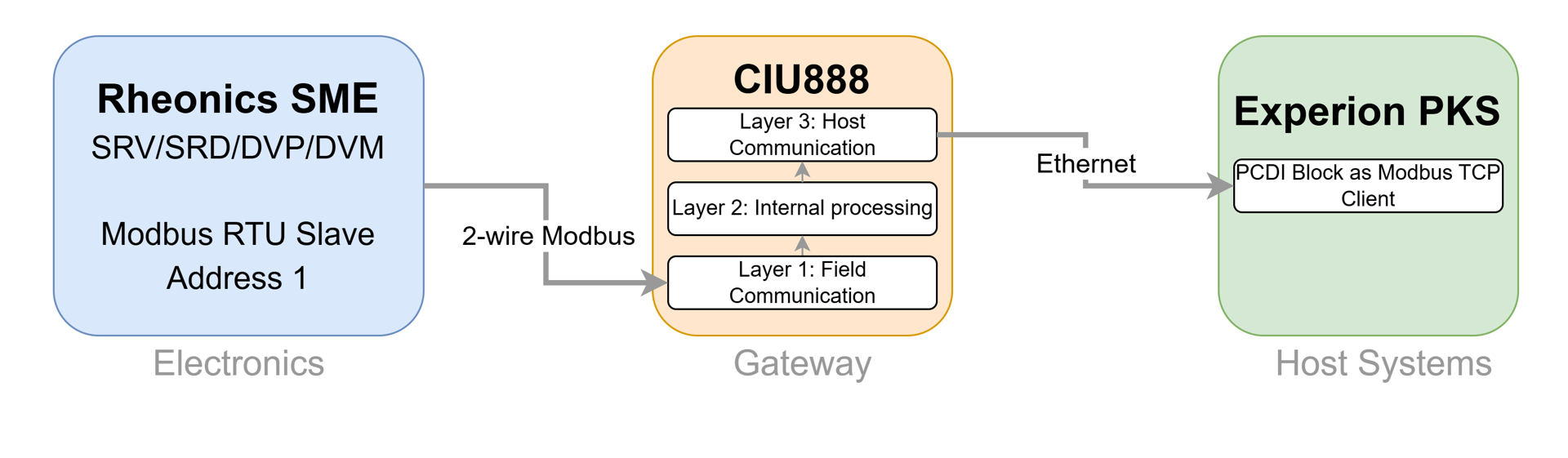
Figure 1. Rheonics SME data to Experion PKS through the CIU 888
→ See Rheonics SME Modbus RTU Integration with Honeywell Enraf for the step-by-step connection and configuration of the SME on a CIU 888 field port. → See Modbus Input Registers for the SME register addresses used when building the CIU 888 device configuration file. |
3. Integration of Rheonics SME and Experion
If no CIU 888 is present, or the SME values do not need to be consolidated with tank inventory data, Experion can poll the SME directly over Modbus TCP. In this case, the register map used is the SME's own published Modbus TCP map, with no intermediate remapping layer.
The SME runs a native Modbus TCP server on TCP port 502 with Unit ID 255. DHCP is enabled by default, so set a fixed IP address, subnet mask, and gateway for the SME in the Rheonics Control Panel (RCP) before configuring the Experion side. Experion then polls the SME the same way it polls the CIU 888 host layer, through the PCDI block of a C300 controller [4] or through the Modbus interface of the Experion Server, pointed at the SME IP address and register map instead of the CIU 888.
- Simpler dependency chain. No CIU 888 configuration or Service Tool work is involved. The SME register map comes from the Rheonics Modbus TCP Operators Manual [6], and the rest of the configuration is done on the Experion side.
- Same Experion-side licensing. The Modbus TCP client is part of Experion in both paths, whether it is PCDI on a C300 controller or the Modbus SCADA interface on the Experion Server. Bypassing the CIU 888 does not add or remove any Experion license; confirm the licensing of the interface used with the site's Honeywell integrator.
- Controller generation matters.
- Confirm with the site's Honeywell integrator which controller is installed.
- PCDI (Peer Control Data Interface) is a C300 feature and uses Modbus TCP only, so an SME connected over Modbus RTU needs a Modbus RTU-to-TCP gateway in front of it.
- No automatic redundancy or consolidation.
- The SME connection is not covered by any CIU 888 Primary/Secondary failover. Any redundancy has to come from the Experion architecture.
- The SME values are not grouped with the tank gauging data. They do not reach the CIU 888 inventory calculation or Entis Pro unless they are mapped there separately.
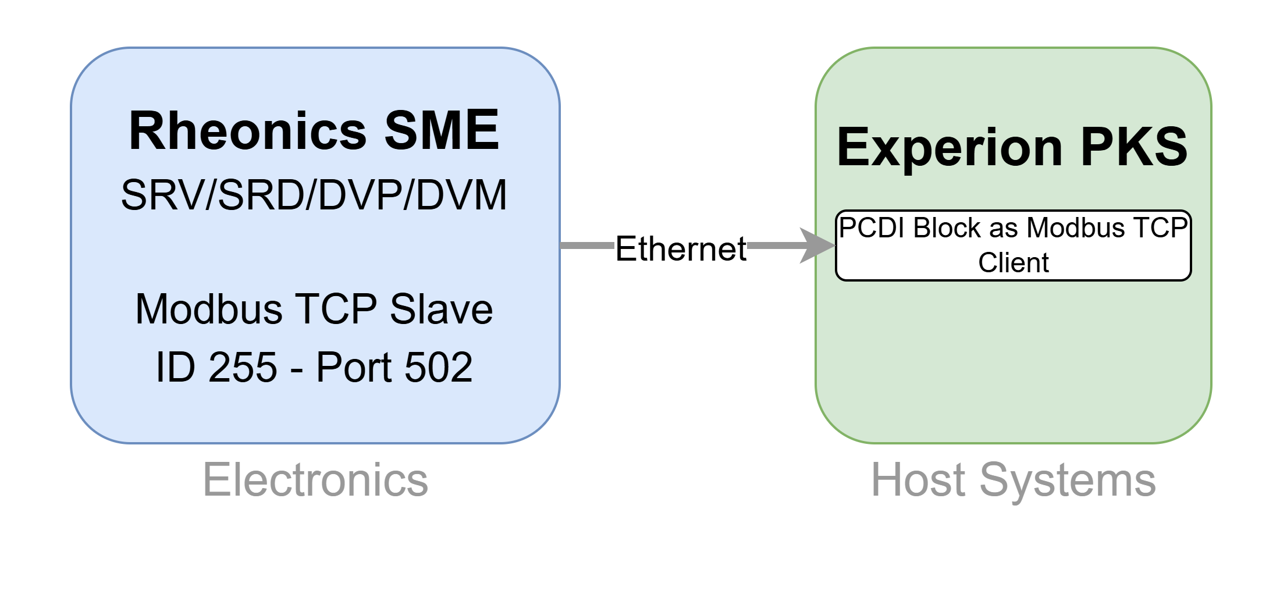
Figure 2. Rheonics SME data to Experion PKS directly over Modbus TCP
→ See Connecting Rheonics SME to Modbus TCP: Setup & Configuration for the SME network settings and Ethernet wiring. → See Modbus TCP Input Registers for the full register map used to build the Experion Modbus points. → See Quick Modbus TCP verification using Modbus Poll master software to confirm the SME answers on the network before configuring Experion. |
Related articles
References
[1] Honeywell CIU 888 Configuration Manual (Part No. 4417584): Modbus map and Unit ID configuration, Experion PKS redundancy integration. [2] Honeywell CIU 888 Security and Installation Guide (Part No. 4417597): TCP host ports and firewall recommendations. [3] Honeywell CIU 888 Introduction Manual (Part No. 4417591) and Datasheet: field and host protocols, physical layer and Field Communication Ethernet option specifications. [4] Honeywell Experion PKS C300 Controller product page: PCDI (Peer Control Data Interface) and supported protocols. [5] Honeywell Experion PKS Modbus TCP Firewall User's Guide, Release 515: write function codes and Slave Configuration tab. [6] Rheonics Modbus TCP Operators Manual, MTCP‑OP‑2403: https://cdn.rheonics.com/wp-content/uploads/2024/04/Rheonics-Modbus-TCP-Manual_MTCP-OP-2403.pdf |