
What is the purpose of this article? To explain how to bring Rheonics measurements (viscosity, density and temperature) into a tank inventory host through a Honeywell Enraf CIU 888, using the native OPC UA TCP server on the CIU 888 Ethernet host ports. What products are involved? The Sensor Module Electronics (SME) with an SRV, SRD, DVP or DVM sensor, and a Honeywell Enraf CIU 888. The SRV measures viscosity and temperature only; density is available from the SRD, DVP and DVM. |
TABLE OF CONTENTS
- 1. Overview
- 2. Configuring the CIU 888 Modbus field port
- 3. Configuring the CIU 888 OPC UA TCP host port
- 4. Connecting ENTIS or another OPC UA client
- Related articles
- References
1. Overview
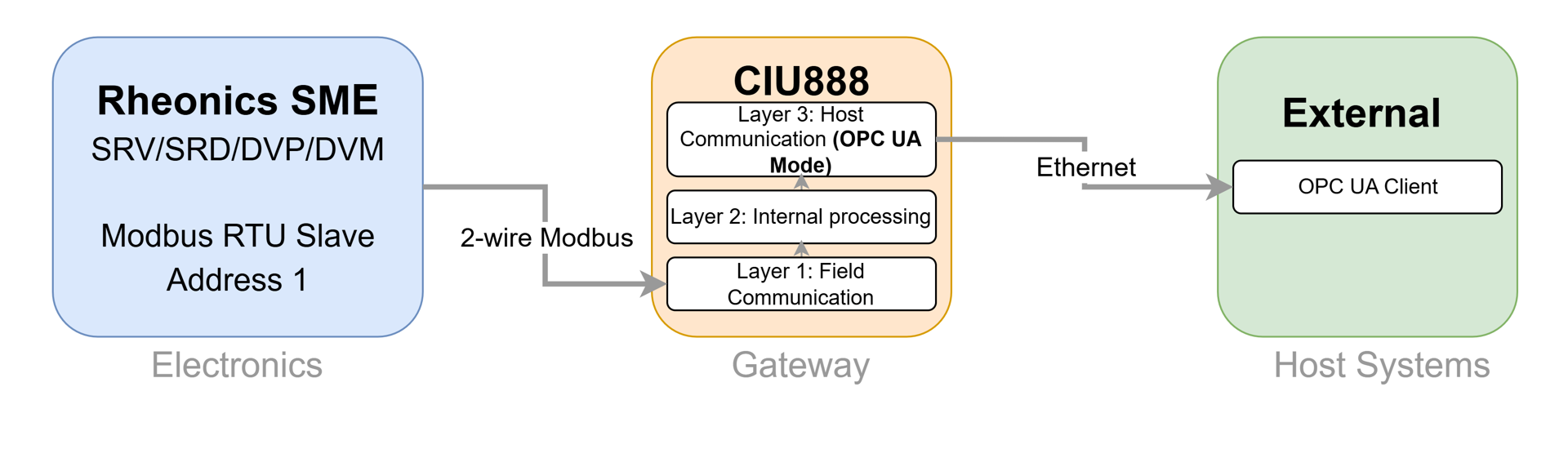
The CIU 888 configures field side and host side connectivity separately (Figure 2):
- Field side. The CIU 888 acts as a Modbus RTU master over RS‑232 or RS‑485, polling third party Modbus RTU devices such as the SME (Layer 1).
- Host side. The CIU 888 exposes the collected and calculated tank data as a Modbus TCP/IP server or an OPC UA TCP server on its Ethernet host ports: FTEA, FTEB or Office LAN (Layer 3). Host systems such as Honeywell ENTIS, Experion PKS or third party tank inventory software connect as clients [1].
The SME is available in three variants (Figure 1). All three carry the same Modbus RTU registers, so this article applies to any of them; the variant only changes the installation.
Note: Polling the SME requires a Serial Modbus card fitted in a free option slot of the CIU 888, and the OPC UA host interface must be included in the CIU 888 identification code [1][2]. Confirm both against the site's CIU 888 hardware and software configuration before starting. |
2. Configuring the CIU 888 Modbus field port
Field port and site configuration is done in the CIU 888 Service Tool. The Rheonics SME is not one of the device types built into the tool, so it is added as a new Modbus field device type through an XML device configuration file, imported with Import MODBUS device type file on the CIU 888 node. Once imported, a Modbus Data Input on the tank can reference it [2].
- Register address format. The CIU 888 uses a six digit Modbus Register Address. The leading 3 marks an input register and the remaining digits are the SME register address plus 1, so SME address 48 becomes 300049.
- Data type. Viscosity, density and temperature are Float32 values (IEEE 754, big endian) spanning two consecutive registers [5].
- Viscosity units. The CIU 888 device template has no native viscosity unit type, so viscosity is carried as DeviceUnitType = ANY, without unit conversion. Any unit handling happens in the host application.
Table 1. SME registers mapped to the tank in the Modbus Data Input
| CIU parameter | Register address | Data type | Engineering unit |
|---|---|---|---|
| Observed Density | 300049 | Float32 | kg/m³ |
| Product Temperature | 300057 | Float32 | °C (user defined) |
| Viscosity | 300041 | Float32 | ANY |
| Gauge Status | 300040 | Float32 | N/A |
→ See Rheonics SME Modbus RTU Integration with Honeywell Enraf for the step by step wiring, field port settings and device configuration file. → See Modbus Input Registers for the full SME register map used to build the device configuration file. |
3. Configuring the CIU 888 OPC UA TCP host port
Once the SME values are live on the field side, they are exposed to host systems by configuring an OPC UA TCP host port on one of the CIU 888 Ethernet interfaces.
- Interface. OPC UA TCP is configured per Ethernet host port (FTEA, FTEB or Office LAN). Office LAN is the usual choice when the tank inventory host sits outside the redundant FTE network.
- Protocol and port. Set Protocol Type to OPC UA TCP and confirm the OPC UA server is enabled on that port. The default server port number is 51000 [2].
- Security. Select the security policy and message security mode required by the site, and set up the server certificate as self signed or CA signed [2]. Only OPC UA TCP is supported; OPC UA over HTTPS is not [2].
- IP address filtering. If IP address filtering is enabled on the host port, add the IP address of the tank inventory host to the allow list.
Important: network segregation. The CIU 888 firewall only opens the ports required for each enabled Ethernet interface. If the OPC UA client cannot reach the server after this configuration, confirm that the host port and its network are correctly segregated and that no upstream firewall blocks the configured OPC UA port. |
4. Connecting ENTIS or another OPC UA client
Honeywell's ENTIS tank inventory system connects to the CIU 888 over OPC UA to read the tank records with the inventory data of each tank [4]. Any other OPC UA client connects to the same server in the same way.
- Endpoint URL. The endpoint follows the pattern
opc.tcp://<CIU_888_IP>:<port>, for exampleopc.tcp://192.168.20.10:51000[2]. Use the port configured on the host port in Section 3. - Security and certificates. The client security policy and certificate must match the CIU 888 configuration (self signed or CA signed), with credentials supplied if anonymous access is disabled.
- ENTIS node. For ENTIS, each tank exposes a dedicated ENTIS node (
CIU888.Tanks.[TankName].ENTIS) that carries the tank record and temperature profile record as a single JSON object [3]. - Where the SME values appear. The SME values are exposed as the tank parameters they were mapped to in Table 1, under that tank in the CIU 888 address space. Browse the server with an OPC UA client such as UaExpert to confirm the node names before configuring the production host.
- Other clients. The same endpoint, security policy, and information model apply to UaExpert for verification, and to Experion PKS or a third party tank inventory host in production.
Related articles
Connecting Honeywell Enraf tank gauging system to Rheonics process density meter Getting Rheonics Density and Viscosity into Entis Tank Inventory via the CIU 888 CIU 888 Redundancy and Rheonics Sensors: Failover Behavior and W&M Sealing Modbus TCP/IP Integration with DataFEED OPC Server Modbus: an OPC path using software middleware instead of a CIU 888. Integrating Rheonics Sensors with OPC UA via Modbus TCP Gateway: an OPC UA path using a compact Modbus TCP to OPC UA converter. Modbus RS485 to USB converter compatible with Rheonics SME: background on the SME RS‑485 interface and termination. |
References
[1] Honeywell, Communication Interface Unit (CIU888), product page and datasheet: https://process.honeywell.com/us/en/products/terminals/enraf-tank-gauging/communication-interface-unit-ciu888 [2] Honeywell CIU 888 Configuration Manual (Part No. 4417584): field port, Modbus Data Input, Modbus field device configuration file, OPC UA TCP host port and OPC UA certificate management. [3] Honeywell CIU 888 Protocol Manual, OPC UA Host Guide, Release R210: OPC UA server specifications, licensing and information model. [4] Honeywell ENTIS Tank Inventory System Specification, R140.1: ETDOC‑X618‑en‑R140.1 [5] Rheonics Modbus RTU Operators Manual, MRTU‑OP‑2403: https://cdn.rheonics.com/wp-content/uploads/2024/04/Rheonics-Modbus-RTU-Manual_MRTU-OP-2403.pdf |